
内容简介:
效果图片:
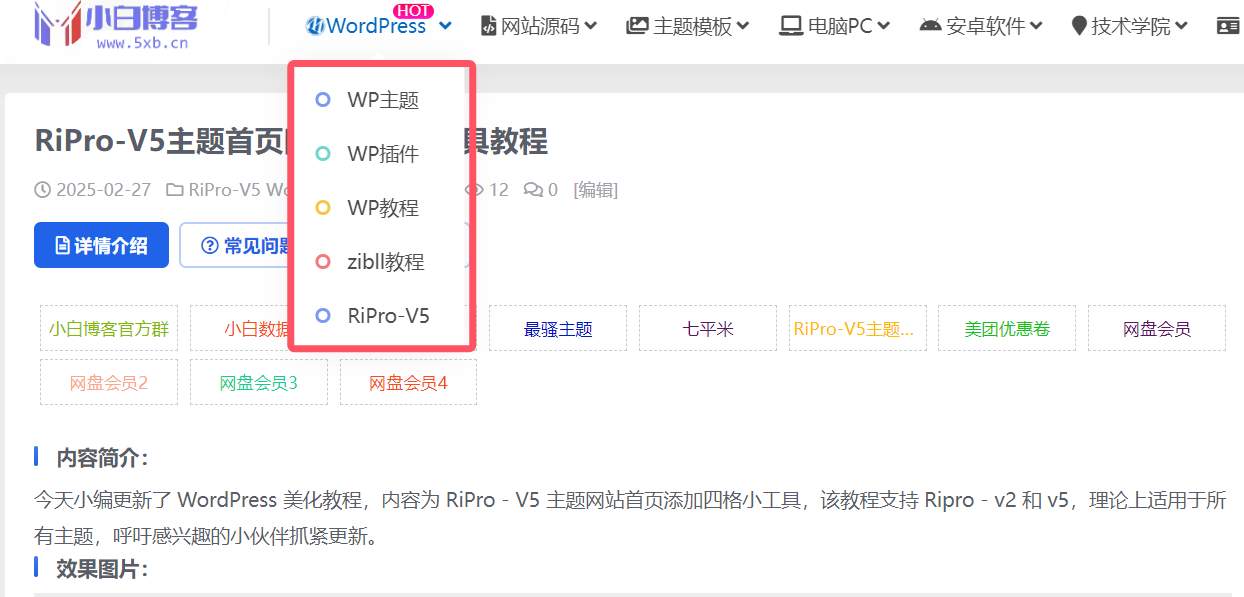
美化代码:
/***二级导航前面小圆点***/

.lanse {

    box-sizing: border-box;

    content: '';

    width: 12px;

    height: 12px;

    border-radius: 50%;

    position: absolute;

    top: 50%;

margin-left: 10px;

    margin-top: -6px;

    left: 0;

border-color: #61e1b9;

border: 3px solid #7a99f2;

}


.lvse {

    box-sizing: border-box;

    content: '';

    width: 12px;

    height: 12px;

    border-radius: 50%;

    position: absolute;

    top: 50%;

margin-left: 10px;

    margin-top: -6px;

    left: 0;

border-color: #61e1b9;

border: 3px solid #70d7cf;

}

.huangse {

    box-sizing: border-box;

    content: '';

    width: 12px;

    height: 12px;

    border-radius: 50%;

    position: absolute;

    top: 50%;

margin-left: 10px;

    margin-top: -6px;

    left: 0;

border-color: #61e1b9;

border: 3px solid #f5c745;

}

.hongse {

    box-sizing: border-box;

    content: '';

    width: 12px;

    height: 12px;

    border-radius: 50%;

    position: absolute;

    top: 50%;

    margin-left: 10px;

    margin-top: -6px;

    left: 0;

    border-color: #61e1b9;

    border: 3px solid #f1787f;

}

/***二级导航前面小圆点结束***/
第二部:在菜单添加一下代码:
<i class="hongse"></i> //这里的"hongse"对应的是上面CSS样式,一共4个样式,根据自己的爱好可以作相应的调整

评论(0)